
Introduction
The OpenAI DevDay 2025 announcements signal a new era for enterprise AI — one where agents no longer live inside a single ecosystem but collaborate across them.
With AgentKit now generally available, organizations have more flexibility than ever to build and connect agentic AI systems.
Drawing on my experience in CRM strategy and Salesforce architecture, I see a clear opportunity for hybrid agentic AI models — solutions that combine the openness of OpenAI’s ecosystem with the enterprise depth and governance of Salesforce.
Why Hybrid Matters
Many enterprise clients express the same concerns:
- They want to accelerate automation with AI but fear vendor lock-in.
- Full-stack CRM ecosystems, while powerful, can be costly and rigid when implemented end-to-end.
Hybrid AI architectures solve this challenge by combining the best of both worlds:
- OpenAI AgentKit — for open, model-agnostic intelligence, data analysis, and real-time customer interactions.
- Salesforce Agentforce & MCP — for secure execution, governance, and CRM-anchored data management.
This partnership between flexibility and structure allows enterprises to innovate faster without sacrificing control.
How Hybrid Agentic AI Works in Real CRM Scenarios
Let’s explore below use cases where a hybrid agentic approach delivers immediate business impact.
Use Case 1: Intelligent Lead Nurturing in Marketing
Challenge:
Marketing teams need to identify, qualify, and nurture leads efficiently across multiple digital channels.
Solution:
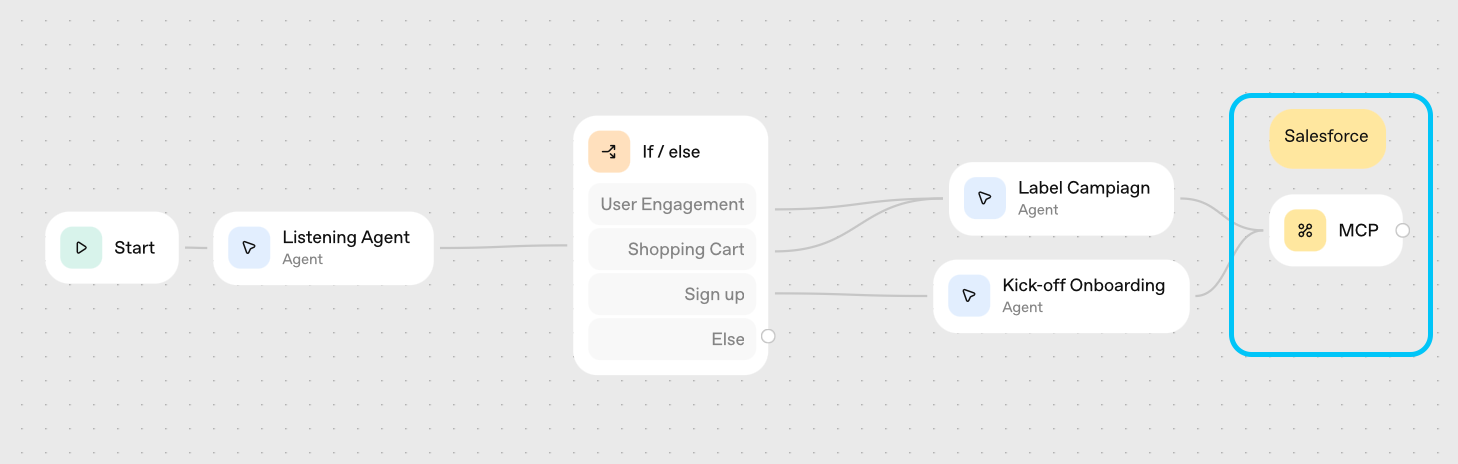
Deploy AgentKit (or similar agentic tools) on your website or app to analyze visitor behavior — tracking engagement patterns, performing lead scoring, identifying qualification criteria and offering conversational shopping assistance on the front end.
The results can then be sent to Salesforce Marketing Cloud Engagement, which triggers personalized workflows such as:
- Lead nurturing sequences
- Campaign automation
- Dynamic content personalization
Result:
Top-funnel intelligence is managed by OpenAI’s flexible agents, while bottom-funnel engagement and conversion are handled by Salesforce’s CRM workflows — a clean division of strengths that increases both speed and precision.
Use Case 2: Smarter Customer Service Orchestration
Challenge:
Service teams not spending valuable time managing complex inquiries .
Solution:
Implement AgentKit on your website’s chatbot or service portal to handle first-line interactions such as:
- Frequently asked questions
- Product return requests
- General inquiries or complaints
When escalation is needed, AgentKit passes structured summaries into Salesforce Service Cloud for routing and case management. It can also integrate with your email service providers to send confirmation messages and update ERP systems in real time.
Complex service cases handling remain within Salesforce, where AgentKit provides orchestration and connectivities with other AI solutions within the entire service workflow.
Result:
Customers receive faster, AI-powered responses, while human agents and Salesforce Agentforce can dedicate their time to resolving complex or sensitive cases.

Use Case 3: Account Health Monitoring
Challenge:
Customer success teams often struggle to proactively identify at-risk accounts before churn happens. Signals of dissatisfaction are buried in emails, chat transcripts, survey comments, or social media — unstructured data that traditional CRM systems can’t easily interpret in real time.Solution:
AgentKit continuously monitors customer sentiment and feedback across multiple channels — email, chat, social mentions, and service logs. Using language understanding and pattern detection, it flags early indicators of declining satisfaction or reduced engagement.When potential churn signals are detected, AgentKit sends structured alerts to Salesforce Customer 360, where Agentforce automatically triggers follow-up actions such as:
- Assigning tasks to Customer Success Managers
- Scheduling outreach calls or personalized retention offers
- Initiating automated check-in workflows or surveys
Result:
Your organization shifts from being reactive to proactive — addressing potential churn before it happens. AgentKit provides the insight layer through unstructured data analysis, while Salesforce Agentforce ensures timely, governed action through CRM automation and customer success playbooks.
Summary Recommendation
| Scenario | Best Choice |
|---|---|
| CRM-focused AI agents for sales, service, or marketing | Salesforce Agentforce |
| Enterprise using both Salesforce and external systems | Hybrid: AgentKit + Salesforce MCP integration |
Notes & Insights
Salesforce MCP is currently in pilot testing and not yet open for direct AgentKit integration.
AgentKit became generally available on November 1, 2025, with transparent pricing (early-access testing was free).
Open-source flexibility and CRM domain depth are not opposites — they’re complementary layers in the next generation of enterprise AI.
Closing Thoughts
The evolution of AI agents is no longer about choosing a platform — it’s about connecting them.
Hybrid agentic AI Solutions let organizations stay flexible, grounded, and innovative — combining the creativity of OpenAI with the trust architecture of Salesforce. The companies that master this balance will define the next era of intelligent business automation.













 Connected Force